Every tool a musician needs, on one desk.
Play the piano and watch it written down as you play. Tune your guitar, keep time in 7/8, sing over a tanpura and look up any chord in your key. One free page in your browser, from Nathaniel School of Music.
Free. Nothing to install. Works on a computer or a phone.
Watch the music move.
Two ways to see what you play, for teaching and for your own practice. Both turn on with one tap above the piano.
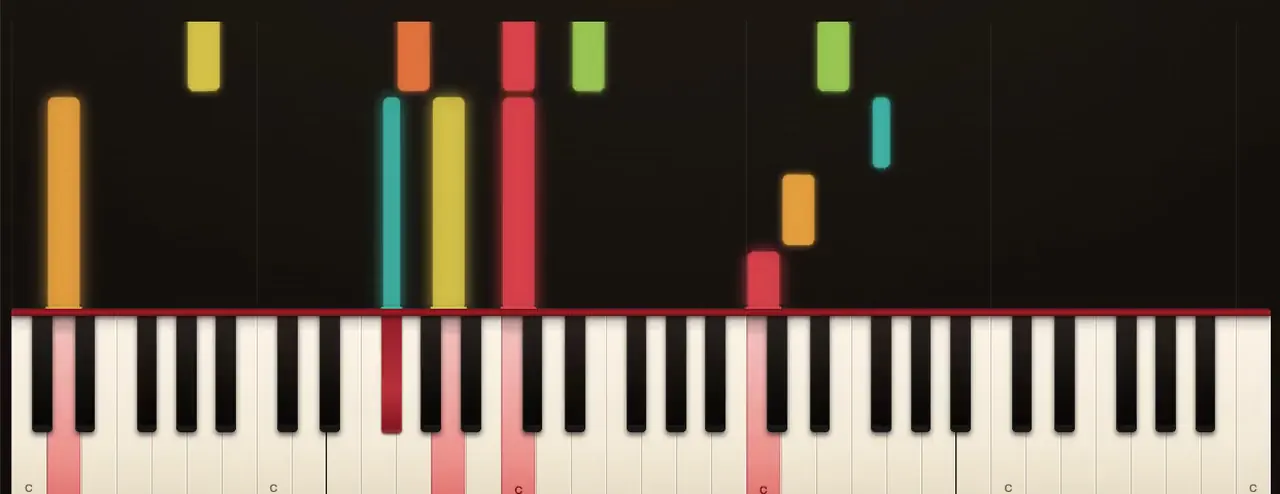
Rising notes
Every key you press sends up a bar of light in its own colour, like a MIDI visualizer. Here a turnaround in G: Gmaj7, Em7, Am7, D7.
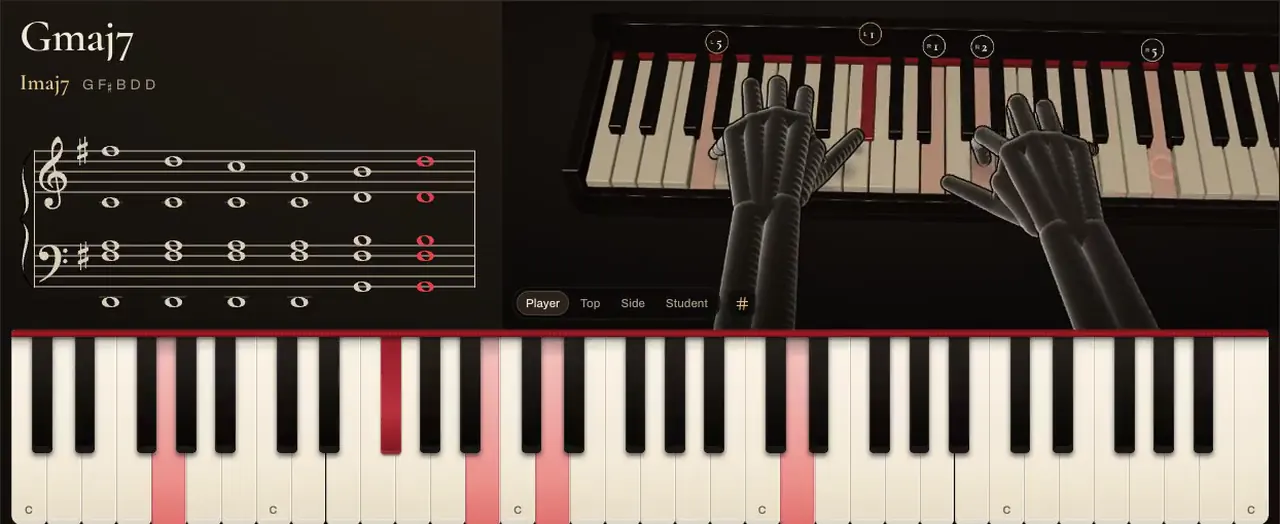
3D hands
Hands drawn from the notes you play, with the finger numbers worked out for you. Three styles (Silhouette, Spectre, Constellation) and four angles: Player, Top, Side and Student. Point a webcam at your own hands instead and Pitara shows which finger plays which key.
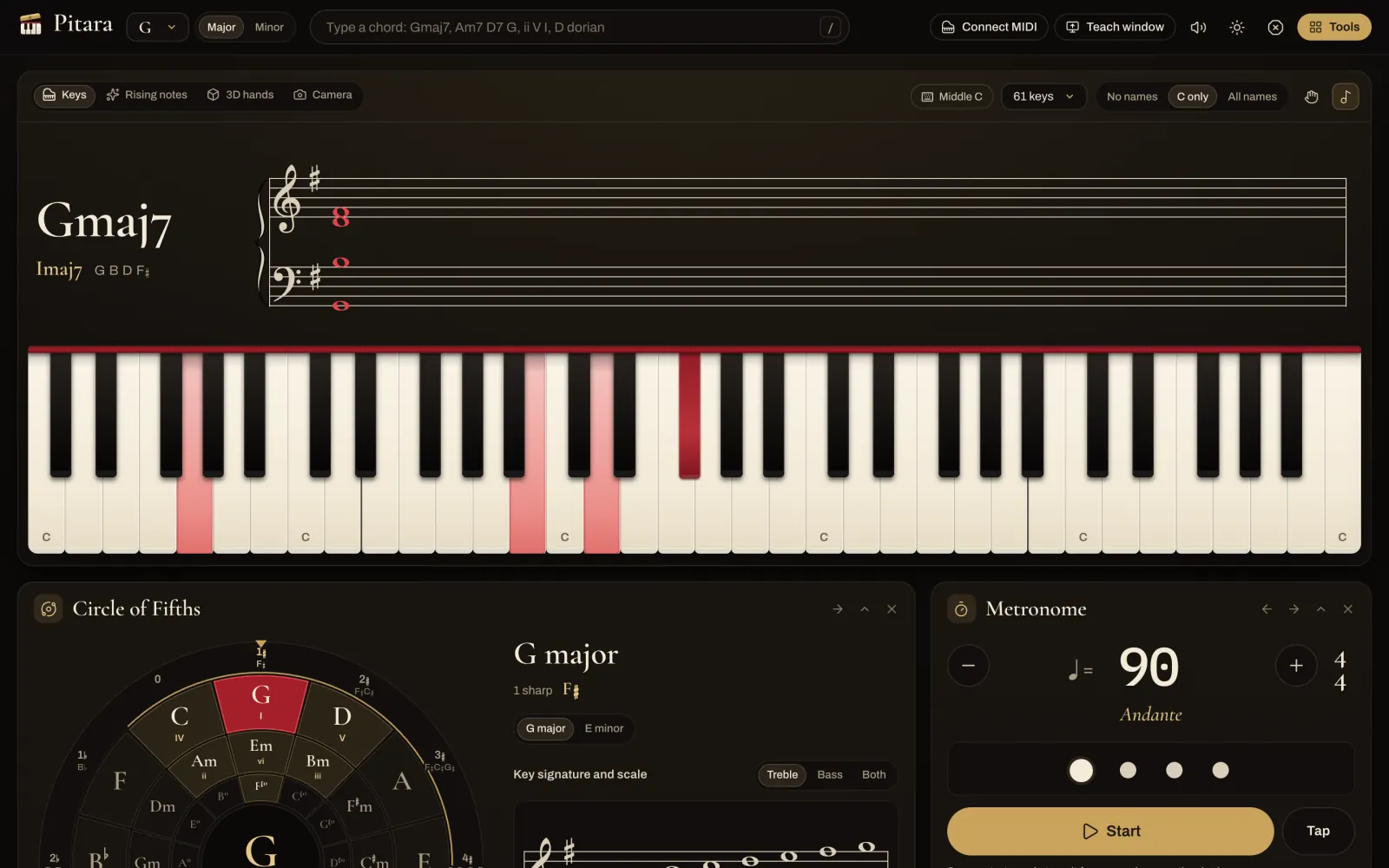
Play, and see it written.
Play with the mouse, your computer keys or a MIDI keyboard and pedal. Every note lands on a grand staff, spelled in your key, with the chord named and its roman numeral beside it.
- Computer keys play like a piano: A W S E D F T G Y H U J K. Z and X change octave.
- Type chords and Pitara plays them in time: Gmaj7, Am7 D7 G, ii V I, V7/V.
- Anything from 25 to 88 keys, with note names on the keys if you want them.
- MIDI keyboards and sustain pedals work in Chrome and Edge.

Teach on Zoom, or on a projector.
Press Teach window and Pitara opens the stage in a window of its own. Share just that window in Zoom or Google Meet, and your students see the keys, the notation and the hands, big and clean.
- The teaching window is silent, so nobody hears the piano twice.
- Change the key, the scale or the view on your desk and it follows.
- Full screen in one click for a classroom projector.

Tune anything you play, or sing.
The tuner listens through your laptop mic or an audio interface. It learns the noise in the room while you are quiet and listens past it, so the needle settles on your note.
- Guitar in standard, Drop D, DADGAD, Open G, Open D and half a step down. Bass with 4 or 5 strings, ukulele, six-string banjo, violin, viola and cello.
- Voice mode draws your pitch as a line, so you can see how steady you are. Indian mode shows the swara you sing against your Sa.
- The pitch pipe gives singers a starting note, and its interval practice listens and tells you how many cents sharp or flat you are.

Keep time, even in 7/8.
Pick a time signature and group the beats the way the music feels: 7/8 as 2+2+3, 3+2+2 or 2+3+2. Tap any beat to accent it, soften it or leave it silent.
- 5/8, 7/8, 9/8, 11/8, 13/8, 15/8, 5/4, 7/4, and any meter you make yourself.
- Subdivisions and swing, in eight sounds from a click to a shaker.
- A speed trainer that raises the tempo every few bars, and a gap trainer that drops bars out so you learn to hold the time yourself.
- Tap tempo, and the space bar starts and stops it from anywhere on the desk.

Clap it. See it written.
Open the rhythm pad, clap after the one-bar count-in and Pitara writes the rhythm down as notation. Sing instead and it writes the notes, spelled in your key.
- Up to eight bars, in any time signature.
- Five ways to read it: Rhythm, Melody, Lead sheet, Counting and Grid.
- Or write by tapping note values, and hear it played back.

A tanpura that keeps going.
Choose Pa, Ma or Ni for the first string and sing for as long as you like. Sa follows the key on the desk, or lock it to your own and fine-tune it in cents.
- Low, middle or high.
- It keeps playing while you use the tuner, the piano or anything else on the desk.
- Pa suits most ragas. Use Ma when the raga has no Pa, and Ni when it is built around Ni.
The Pa and Ma drones are acoustic recordings from Raga Junglism (open-access). Ni is modelled.
Open the tanpura
Theory in your key, and playable.
The handbook works in the key you choose. Tap a scale, a chord, a progression or a cadence and it plays and lights up on the piano.
- Scales and modes, chords and voicings (drop 2, shell, rootless), and intervals with an ear check.
- Harmony in the key: secondary dominants, tritone substitutes, borrowed chords, the Neapolitan and the Italian, French and German sixths.
- Modulation by pivot chord, and five cadences.
- A circle of fifths you spin with a finger, with the chords of each key and their numerals.

Every scale on every fretboard.
Guitar, ukulele, six-string banjo and bass. Light up any scale across the neck, from the major modes to the 72 melakartas and the ten thaats, or see chord shapes with finger numbers.
- The whole neck, the CAGED shapes or three notes per string.
- Open and barre chord shapes, and arpeggios.
- Play the piano and the same notes appear on the strings.
- A left-handed view.

Practise, and keep the log.
Pitara counts the time you actually play: notes, sound from the desk, a tool listening. It stops after two quiet minutes, so a tab left open does not count.
- See today’s minutes on this device.
- Nathaniel School of Music students sign in with Woodshed. Pitara keeps the time in their Woodshed practice log and shows the week and their streak.
- Signed-in students can add 15 or 30 minutes practised away from the screen.

And the small things a lesson needs.
Calculator
Everyday sums, and music maths: tempo to milliseconds, delay times, song length, Hz to note names, cents, changing key, capo fret.
Sticky notes
Paper notes you type on, or draw on with a mouse, a pen or a finger.
Search
One box for Google, YouTube, IMSLP, MuseScore, Ultimate Guitar and Nathaniel School of Music lessons.
Clock
World clocks, a class planner across time zones, and practice, countdown and stopwatch timers.
Free, in your browser.
Pitara is free to use. There is nothing to install and no account to make: open the page and play. It remembers your desk on each computer or phone you use.
Questions
Is Pitara free?
Yes. Pitara runs in your browser at pitara.nathanielschool.com, with nothing to install.
Who made Pitara?
Nathaniel School of Music in Bangalore, founded by Jason Zac.
Does it work on a phone?
Yes. The desk rearranges itself for a phone. A MIDI keyboard needs Chrome on a computer or Android.
Which browser is best?
Chrome or Edge on a computer: they support MIDI keyboards. Safari and Firefox run everything else.
Can I use my MIDI keyboard in the browser?
Yes. Open Pitara in Chrome or Edge, press Connect MIDI and allow it once. Sustain pedals work too. Safari has no MIDI support yet.
How do I share only the piano in Zoom?
In Pitara press Teach window. In Zoom choose Share Screen, then pick the window called Pitara Stage instead of your whole screen.
Will my students hear the piano twice?
No. Only the main desk makes sound. The teaching window makes no sound of its own: even notes you play in it are sounded once, by the main window.
Which tanpura tuning should I use?
Pa suits most ragas. Use Ma for ragas without Pa, such as Malkauns, and Ni for ragas built around it, such as Marwa.
Go straight to a tool
- Piano with notation
- Teach online
- Tuner
- Metronome
- Tanpura
- Circle of fifths
- Fretboards
- Theory handbook
- Pitch pipe
- Sing it once. Pitara carries it through every key.
- Rhythm pad
- What key is this song in?
- One link. Your piano, live, on every student's screen.
- See exactly where the thumb goes under.
- Ten questions a day for a sharper ear.
- Read it, play it, see every note marked.